Introduction
The goal of this page is to describe some Web 2.0 tools that you may find useful in teaching a class, both online and face-to-face.
What is it? "Microblogging"
Twitter for Academia
A professor of Emerging Media and Communication at the University of Texas in Dallas has written a great article on some creative ways to use Twitter in an academic setting. In 2007, he gave his students an assignment to use Twitter, and was pleasantly surprised at the results.
Some highlights he mentions in his writeup include connecting students outside of class time and creating more of a sense of community with his students. He even says that using Twitter can be an effective tool to teach grammar.
Twitter in the Classroom
This University of Texas at Dallas professor successfully used Twitter to hold classroom discussions in a class of 50 students. She felt it was a great way to get more students involved in the discussions, students who may normally be too shy to speak up in a large class setting.
Here are some examples of what the students were tweeting:
- #h1302w13 I think that Chief Justice Earl Warren really made it known what he believed is right when it comes to desegregation in schools. link
- #h1302w14 the U.S. program of removing troops at a gradual rate and the effects of overturning responsibility for the S. Vietnam government link
The code at the beginning of the tweet marks these tweets as belonging to History 1302 week 13 and 14. Using this code it is possible to use Twitter Search to find all tweets relating to the current day's discussion.
Twitter in Conferences
A great use of Twitter is to connect with people at a conference. Typically a conference will have an associated hashtag so people can find any related tweets. For example, attendees of the eLearning 2009 conference put on by the Instructional Technology Council used the hashtag #itc09 to identify their tweets. Before, during and after the conference, searching Twitter for #itc09 would bring up tweets by people who were attending the conference.
During the conference, you can use Twitter search to connect with other people at the conference who you may or may not already know. During conference sessions, it can be very interesting to have side discussions via Twitter to see how other audience members are reacting to what the speaker is saying.
Here are some examples of Twitter usage at the eLearning 2009 conference:
- Audience reactions during a debate about second life
- Twitter mixed with live-blogging during a talk about Web 2.0, Gaming and Mobile Computing
Google Docs
What is it? Collaborative document editing, including spreadsheets and presentations
Google Docs has a word processor which can be used to write papers like Microsoft Word. Where Google Docs shines is its ability to collaborate on documents with other people.
Google Docs for Group Projects
This professor at the University of Texas at Austin has discovered some great uses for Google Docs. He has used it for group projects, where several students are editing the same paper. They can all have access to the same document, and actually write the paper together. Without Google Docs, you can imagine how difficult it would be to coordinate writing a paper between 3 or 4 students: it would be difficult to track the multiple versions floating around, keeping track of who had the latest version. Google Docs lets multiple people have the document open, and when one person types, everyone else sees the changes almost instantly.
Grading and Feedback in Google Docs
He also highly recommends it not only for collaborative projects, but also for collecting and grading student papers. It is possible to add comments inline, so you could actually give feedback to the students right in their document.
Turning in and grading homework electronically also saves paper!
Wikis, Blogs, and Forums
What is the difference??
Blogs
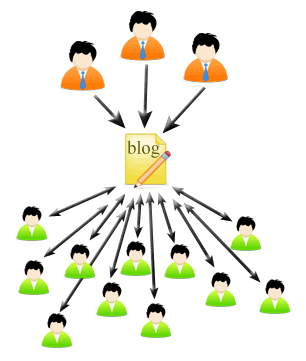
One or more authors, writing to a larger audience
A blog is a type of website updated at somewhat regular intervals with commentary or descriptions of events. A blog can have one or more authors. The author(s) have something of value to share, so they write about it on their blog. An audience reads the blog, and can leave comments on the posts. The comments can create a dialogue between the authors of the blog and the readers.
Wikis
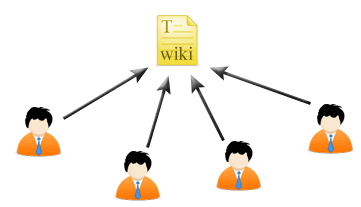
Many authors contributing to a shared document
A wiki is a way to collaboratively edit a collection of web pages. In a wiki, everyone is writing with the intent that the content will remain on the website and stay relevant. You could use a wiki to write a tutorial, but you wouldn't use a wiki to keep a journal of a vacation. A wiki is a great tool to collaborate with a group on creating a website or collecting information.
Forums
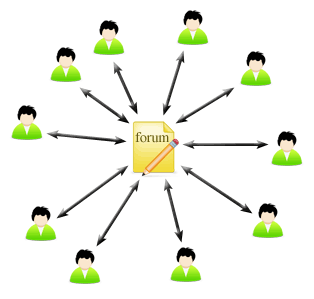
Many-to-many discussion
A forum is a tool to facilitate group discussion. With forums, it's less about the document and more about connecting people to each other. Where a blog has "posts," a forum has "threads." A thread might start out with a question, and many people can chime in with their responses.
- PBWorks - Free wiki hosting
- blogger.com - A popular blogging platform
- wordpress.com - Another popular blogging platform, geared more towards "pro" users
- Watch Wikis in Plain English
- Watch Blogs in Plain English
- Watch LCC faculty talk about using forums in their classes
Wikipedia
A professor at the University of Washington had her students write their term papers in Wikipedia. This proved to be a valuable learning experience for the students as well as the professor.
Her slideshow summarizing the project is embedded below. Some of the key points:
Term Paper Limitations
- Audience of one
- Time- and place-bound
Learning Issues
- How to make a term paper a larger learning experience (rather than a limited academic exercise)
- How to motivate students to do their best work
What Worked Well
- Students invested more in their work, felt greater ownership, and experienced greater returns for their efforts
- Products were generally better written than typical term papers
What Didn't Work Well
- Students needed extra guidance to create high quality articles in encyclopedia style
- More instructor time required to shepherd students through entire process
If you don't think you're ready to take on this level of a project, you could start by developing your own wiki. This may be more appropriate for certain topics which might otherwise be difficult to integrate into the Wikipedia community. Each term your students could contribute to your wiki, and over the course of several years it could be a valuable repository of information, where students continue to learn from and build on it.
YouTube
Students in Tammie Stark's Water Management course created an instructional video onhow to do a home water audit.
Creating a video is a great way to get students more involved in the material. By creating a video, you are in a way, assessing their knowledge about the topic, since it would be difficult to create an instructional video without knowing the material. Like the Wikipedia project mentioned above, students are more likely to be motivated to do better work when it is posted in a public medium such as Youtube.
As an added benefit to the instructor, videos created in the course can be used as instructional material for future terms.
Delicious.com
What is it? Social bookmarking
Delicious.com is a website for storing and finding Web bookmarks. Once you create an account, you can post bookmarks to your profile. Others can then see your collection of bookmarks to discover new things on the Web.
Moodle
What is it? Course Management System
Moodle is an open-source course management system used at Lane for teaching online classes, as well as supplementing traditional classes with online tools. Instructors can post the course syllabus, provide learning materials, give tests, and calculate grades all within the system.